
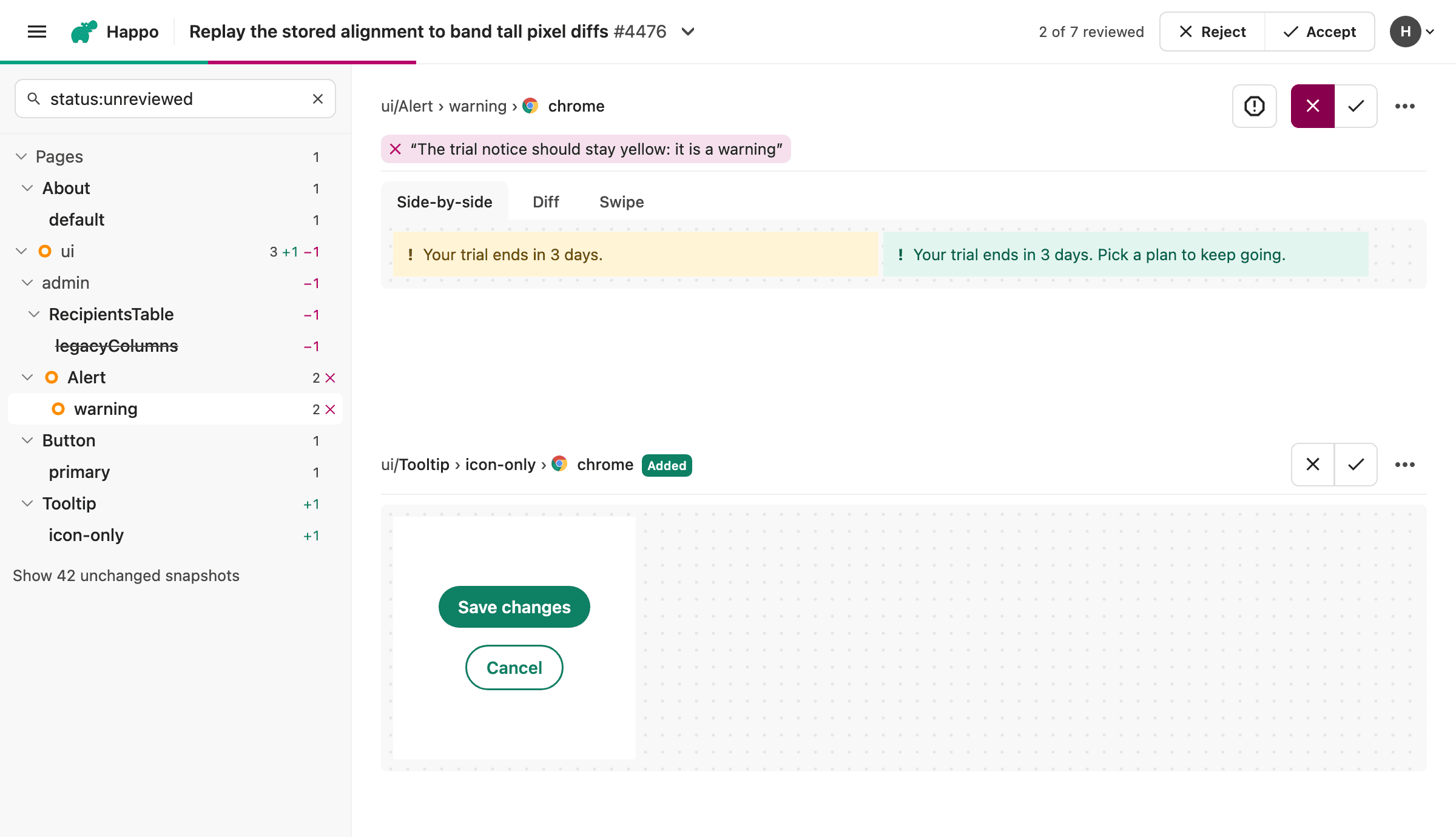
On the new compare page, every diff has its own accept and reject buttons. Until now, a rejection recorded only that the diff was rejected and by whom. The author then had to work out what was wrong, or ask the reviewer somewhere else. Now you can add a short note to a rejection, up to 500 characters, saying what needs fixing.
Several of you asked for this through the feedback form at the end of the new compare page. Thank you, this is exactly the kind of feedback we were hoping for.
Adding a note
The note is a second step, so rejecting is still one click, key press or swipe:
- Mouse or tap. Clicking Reject records the rejection right away and opens a note below the buttons, with the cursor in it. Press Enter to save the note and move on to the next diff, or Escape to skip it.
- Keyboard.
hstill rejects and moves on.Shift+hrejects and opens the note, or opens the note of a diff you already rejected. Press?to see every shortcut. - Swipe. A normal swipe to the left still rejects. Swipe twice as far and the panel reads "Release to reject with a note", and the note opens with the phone's keyboard.
Who sees it
The note shows below the diff for everyone looking at the comparison. It shows up live for anyone who has the page open, so a teammate sees why you rejected a diff without having to ask. Select the note to edit it.
A note belongs to the rejection. If someone accepts the diff later, the note goes away with the rejection it explained.
For AI agents
The note is also available through the Happo MCP server. When an agent reads a comparison, each rejected diff comes with its note, so an agent asked to deal with a rejected comparison knows what the reviewer wanted fixed. An agent can also leave a note itself when it rejects a diff.
Keep the feedback coming
The reactions to the new review experience have been overwhelmingly positive, and we're grateful for everyone who has tried it and told us what they think. We're excited to keep improving it, and your feedback means a lot. When you finish a review, the end of the page asks how it went, with a thumbs up or down and room for a comment. You can also reach us at support@happo.io.

