
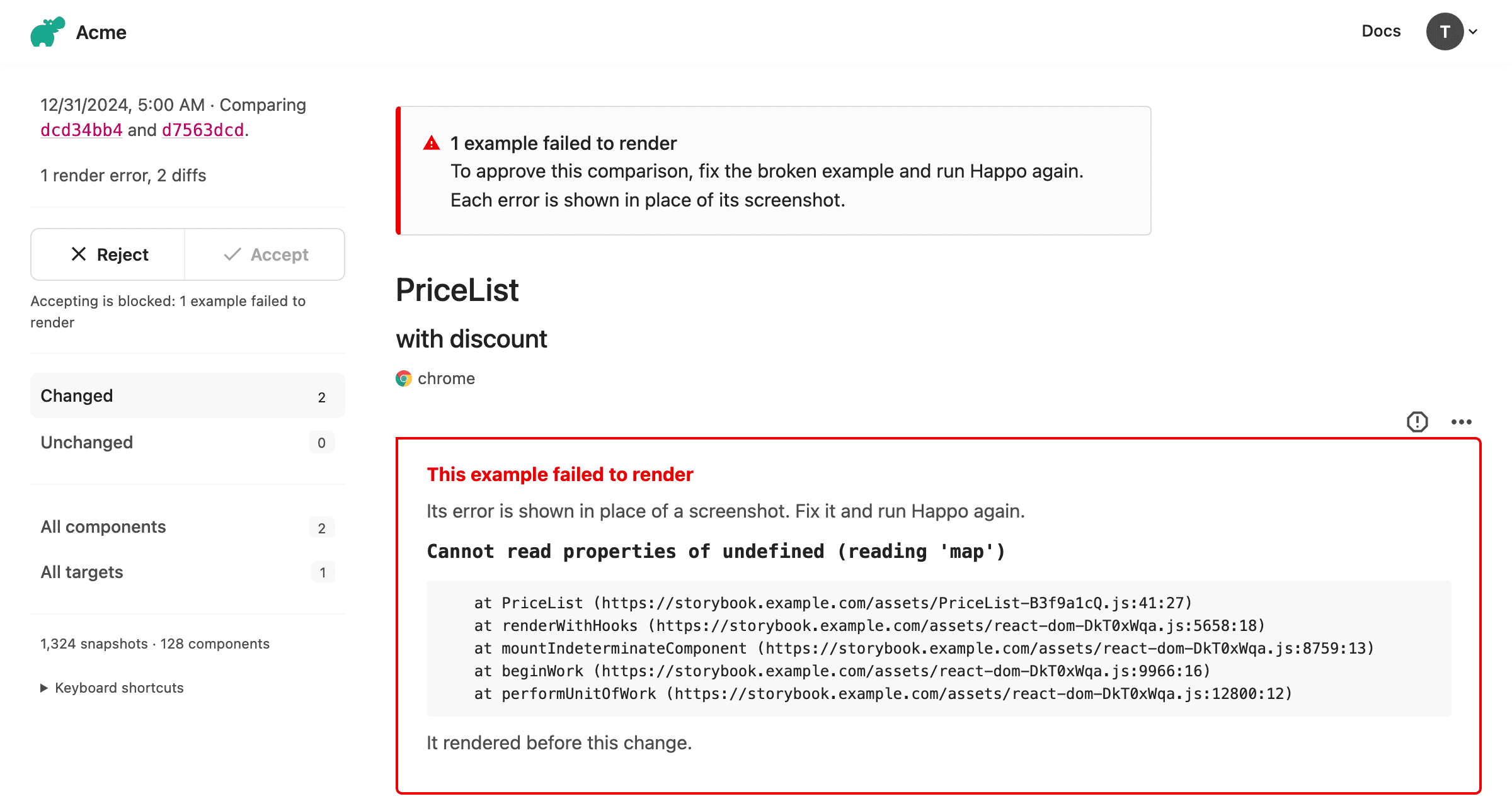
When a Storybook story or an example from a custom integration throws while rendering, an error message ends up on the page in place of the component. Happo used to take a screenshot of that message and put it in the report like any other screenshot. The screenshot showed up as a diff, and if it was approved, the error became the baseline. Later runs rendered the same error, the screenshots matched, and Happo reported no change.
Happo now reports a failed render as an error. Approving a comparison that has render errors is still allowed by default, and a new config option lets you block it.
Why this matters
A render error that is approved as a screenshot stops being reported. The example stays broken, and nothing in later comparisons points to it. The more examples and reviewers a project has, the easier it is for one to get through. With blockApproval.renderErrors on, a pull request can't be merged with a broken example in it, so the error is fixed before it reaches the baseline.
Reporting the error as text also makes it available to everyone reviewing the comparison. Text in a screenshot can't be read by a screen reader, selected, copied or searched. The message and stack trace on the comparison page can.
What the worker reports
When an example fails to render, the worker saves the error message and stack trace as text instead of taking a screenshot. This applies to:
- A Storybook story that throws while rendering
- A Storybook story that fails to load
- An example coming from a custom integration that throws
An error is identified by its message, not its stack trace. Stack traces contain bundle URLs with content hashes that change on every build, so the same error from a rebuilt bundle compares as unchanged.
What the comparison page shows
The error text is shown in place of the screenshot. Each error is marked as new, unchanged from the baseline, or fixed.
A banner at the top of the page says how many examples failed to render. The count covers the whole report, so it includes errors that were already in the baseline.
Blocking approval
The blockApproval option in the Happo config sets conditions under which a comparison can't be approved:
// happo.config.ts
import { defineConfig } from 'happo';

export default defineConfig({
  // ...

  blockApproval: {
    renderErrors: true,
    accessibilityViolations: true,
  },
});
Both conditions are off unless you set them.
With renderErrors on, a comparison can't be approved while the report for the current commit has examples that failed to render, whether the error is new or was already in the baseline:
- The approve button on the comparison page is disabled and shows the reason
- The API responds to an approval with a
409 - An approval from an earlier commit is not carried over
- The comparison is not resolved automatically as unchanged
The status on the pull request stays failed until the examples render and Happo has run again.
With accessibilityViolations on, a comparison can't be approved while it introduces new accessibility violations. This was previously an account setting that only the comparison page enforced. It is now set in the config and also applies to the API.
Requirements
blockApproval needs happo 6.21.0 or later. Reporting render errors as text needs no change on your side.
See the configuration docs for the full reference.

