
The question comes up in almost every evaluation: "What happens to our bill as our Storybook grows?"
It's a fair question. Happo's pricing is per snapshot (visual and accessibility combined) and the math is easy to sketch out on a napkin. You start with a few hundred stories, three or four targets, and the numbers look fine. Then you add dark mode, then iOS Safari, then another team's components land in the repo, and suddenly you're asking Finance for a bigger plan. We've watched teams stall out at exactly this point, not because the product doesn't solve their problem, but because they can't confidently project what they're signing up for at scale.
For a long time, the honest answer we had to give was: reduce the number of targets (e.g. sets of viewport sizes or different browsers), break up your run into multiple projects, or keep your Storybook smaller. None of these are completely satisfying. Keeping coverage small defeats the purpose: the real power of visual regression testing is catching things you didn't anticipate, like a file rename making some CSS silently disappear. Using multiple projects might not be convenient for every repo structure, and selecting at the project level might not be granular enough. Telling people to test less to save money is a bad trade.
Now we have a better answer.
What the --only flag does
Last month we shipped --only in happo v6.10.0. The idea is simple: instead of rendering every story in your Storybook on every PR, you only render the stories that are actually affected by the changes in that PR.
After wiring it up internally, our own Storybook build immediately dropped by 40% in snapshot volume.
That's not a small rounding error, that's a meaningful chunk of your bill, gone, on every PR where you're touching something localized. The full build still runs when it needs to. But partial changes get partial runs. This is good for your PR builds as well as your default branch (e.g. main) builds for baseline reports.
There are two bonuses beyond cost. Partial runs finish faster, so developers get feedback sooner. And because you're rendering fewer things per PR, you're exposed to less potential flake per PR. This helps your team move faster.
How Happo handles --only under the hood
When you pass --only, Happo doesn't simply skip everything else. Here's what actually happens:
- Happo resolves a baseline report — the most recent full report for that branch or target.
- From the
--onlylist, it determines which snapshots need to be freshly generated vs. inherited from the baseline. - The final comparison report is assembled from the new snapshots plus the inherited ones.
This matters for one underappreciated reason: deletions are represented correctly. If you delete a story file, that deletion shows up in the Happo comparison report as a set of removals — one per export in that file. This is different from how tools like Chromatic handle partial runs, where a deleted story file simply isn't represented in the report at all.
If Happo can't resolve a baseline (e.g. first run, new project), it falls back to a full build automatically.
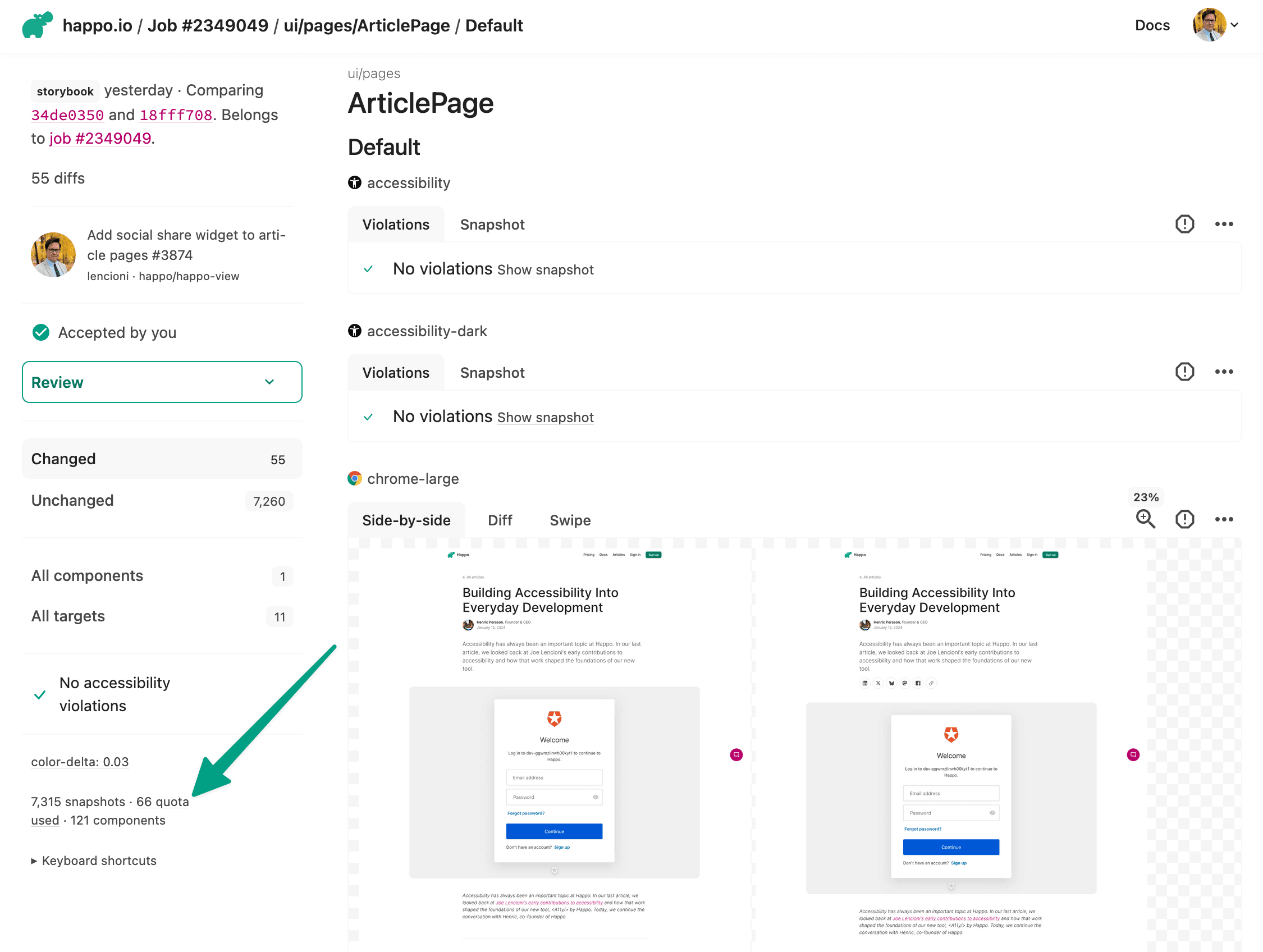
You can see the effect in practice on any comparison report page — there's metadata showing how many snapshots were actually generated vs. the total report size. In one of our own reports: 66 snapshots generated for a full report of 7,315 snapshots.
The mechanism: build a dependency graph, filter to stories
The --only flag takes a list of story files to render. Your job is to figure out which story files are actually affected by a given set of changed files and pass that in. That's a static analysis problem, and there's no single right tool — what matters is the principle.
We use jest-haste-map internally. It builds a module dependency graph, and we do a reverse breadth-first search from each changed file to find every story that transitively imports it.
Here's a condensed version of the wiring:
import { execFileSync } from 'child_process';
import path from 'path';
const HasteMap = require('jest-haste-map').default;

// Changes to these files invalidate the whole graph → full run
const GLOBAL_FILES = new Set([
  '.storybook/main.js',
  '.storybook/preview.js',
  'package.json',
  'pnpm-lock.yaml',
  // ...etc
]);

const STORY_RE = /\.stories\.(js|jsx|ts|tsx)$/;

async function computeOnlyFilter(rootDir: string) {
  const base = getBaseSha(); // from GITHUB_EVENT_PATH
  const changed = execFileSync(
    'git',
    ['diff', '--name-only', `${base}...HEAD`],
    { cwd: rootDir, encoding: 'utf8' },
  )
    .trim()
    .split('\n')
    .filter(Boolean);

  if (changed.length === 0) return null;
  if (changed.some(f => GLOBAL_FILES.has(f))) return null;

  const { hasteFS } = await (
    await HasteMap.create({
      rootDir,
      roots: [rootDir],
      extensions: ['js', 'jsx', 'ts', 'tsx', 'mjs', 'css'],
      computeDependencies: true,
    })
  ).build();

  const reverseDeps = new Map<string, Set<string>>();
  for (const file of hasteFS.getAllFiles()) {
    for (const dep of hasteFS.getDependencies(file) ?? []) {
      if (!dep.startsWith('.')) continue;
      const resolved = resolveImport(path.dirname(file), dep, hasteFS);
      if (resolved) {
        if (!reverseDeps.has(resolved)) reverseDeps.set(resolved, new Set());
        reverseDeps.get(resolved)!.add(file);
      }
    }
  }

  const allStories = hasteFS.getAllFiles().filter(f => STORY_RE.test(f));
  const storySet = new Set(allStories);
  const affected = new Set<string>();

  for (const rel of changed) {
    const queue = [path.join(rootDir, rel)];
    const seen = new Set<string>();
    while (queue.length) {
      const cur = queue.shift()!;
      if (seen.has(cur)) continue;
      seen.add(cur);
      if (storySet.has(cur)) affected.add(cur);
      for (const importer of reverseDeps.get(cur) ?? []) queue.push(importer);
    }
  }

  if (affected.size === 0) return [];
  if (affected.size === allStories.length) return null;
  return [...affected].map(f => ({
    storyFile: './' + path.relative(rootDir, f),
  }));
}
jest-haste-map is what we happened to reach for. But one team currently evaluating Happo took a different path and shared their approach with us (anonymized at their request):
We use dependency-cruiser with the
--reachesflag. Given a list of changed files from git diff, depcruise traverses the full import graph and returns every module that transitively depends on any changed file. We filter those to.stories.tsxfiles and group by project. The key config isdoNotFollow: { path: 'node_modules/(?!@our-scope)' }so it follows workspace package imports but skips external deps. We also avoid barrel exports (per-component subpath exports instead, e.g.import { Button } from "@pkg/ui/button") to keep the graph precise — otherwise a change tobutton.tsxwould flag every consumer of the package viaindex.ts.This gives us file-level precision with full transitive coverage, and depcruise handles TypeScript path aliases,
package.jsonexports fields, etc. natively.
Two different tools, same shape of solution. And since dependency analysis lives in your repo, you can make it a perfect fit for your team's specific patterns.
The right default is: full build when uncertain
This is the part that matters most when thinking about correctness.
The setup we use at Happo defaults to a full build any time we encounter a changed file we haven't explicitly learned to trust. package.json, pnpm-lock.yaml, Storybook config files — all of those trigger a full run automatically. Any file outside the dependency graph that we haven't classified gets treated as globally-affecting.
Trust has to be earned file by file, over time. We started with a conservative list of exceptions and have refined it as we built confidence. Since then we've made adjustments to make it smarter, but the foundation was quick to get in place.
The worry with any partial-run approach is false negatives, a change that affects stories but doesn't get flagged. So far we haven't had one. That's partly good design, partly that our stack (React, TypeScript, ES modules, CSS modules) makes dependencies explicit and easy to trace. If your codebase has a lot of implicit global CSS, or barrel exports that fan out to dozens of consumers, you'll want to be more conservative with what you trust.
A caveat: dynamic imports won't be caught
Static analysis works by following explicit imports. It has a blind spot: story files that dynamically load other files at runtime won't have those dependencies in the graph.
We hit this ourselves. Our Icons.stories.tsx uses require.context to automatically include every icon file in a directory:
// Dynamically load all icon/logo files from this directory.
// When a new icon is added to src/icons/, it will appear here automatically.
const iconContext = (
  require as typeof require & {
    context(
      request: string,
      useSubdirectories?: boolean,
      regExp?: RegExp,
    ): WebpackRequireContext;
  }
).context('./', false, /^\.\/[A-Z][a-zA-Z]*(Icon|Logo)\.tsx$/);
Because the individual icon files aren't explicitly imported, adding a new icon to src/icons/ won't be caught by the dependency graph — and Icons.stories.tsx won't appear in the --only list for that PR.
This is something to watch out for in your own codebase. Any story that uses dynamic loading patterns (require.context, import.meta.glob, or similar) won't automatically surface when the files it loads change. Audit your story files for this pattern early so it doesn't surprise you later.
Two paths in
If you're using Storybook, start at the partial runs documentation: it covers the Storybook-specific wiring for --only. For general CLI usage, the --only flag reference has the full spec.
The setup was genuinely approachable for us. The first working version — something that builds the dependency graph, filters to affected stories, and falls back to a full build when uncertain — was an afternoon of work. You don't need to get it perfect on the first pass. The conservative default (full build when unsure) means you're not risking coverage while you refine it.
If you want to talk through your specific setup, reach out for a demo. Joe and I will be on the other end. We've both done this on our own codebase and can help you reason through what to trust and what to keep in the full-build bucket.
The cost anxiety is real. But it's solvable, and you don't have to reduce your coverage to solve it.
