
Your animations are UI too. A menu slides open with a subtle fade. A loading indicator spins at the right speed. A dialog fades in and blurs the background. Animations add clarity, direction, and joy to an application, and spinners, toasts, skeletons, and transitions break like any other UI.
If you've screenshot-tested a UI that moves, you know the usual workaround: freeze the animation. By default, Happo stops animations on their last frame before taking the screenshot. The end state looks fine, but the motion is gone, and a change to how something moves never shows up as a diff. A whole class of UI never really gets reviewed.
To close that gap, we worked closely with one of our enterprise partners on the research and development behind animation testing. Their team treats motion as part of the design: the easing of a sheet as it slides up, a transition that shows you where you came from, a loading state that feels alive instead of stuck. For them, a screenshot of the last frame isn't enough. That perspective shaped what we built: frames you can step through one at a time, and diffs that show when a change happens, not just that it did.
Their teams have used animated snapshots since before today's launch, reviewing how their product moves the same way they review how it looks.
Seeking, not recording
When you turn animate on, Happo inspects the page for animations it can drive: CSS @keyframes, transitions that have started, view transitions, element.animate(), SVG SMIL. It pauses each one and seeks it to a series of exact times (0 ms, 100 ms, 200 ms, and so on), taking a screenshot at each. The same frames and the same times are used every run, so there's no flaky video to squint at. The frames get stored as a single animated PNG (APNG).
Reviewing motion
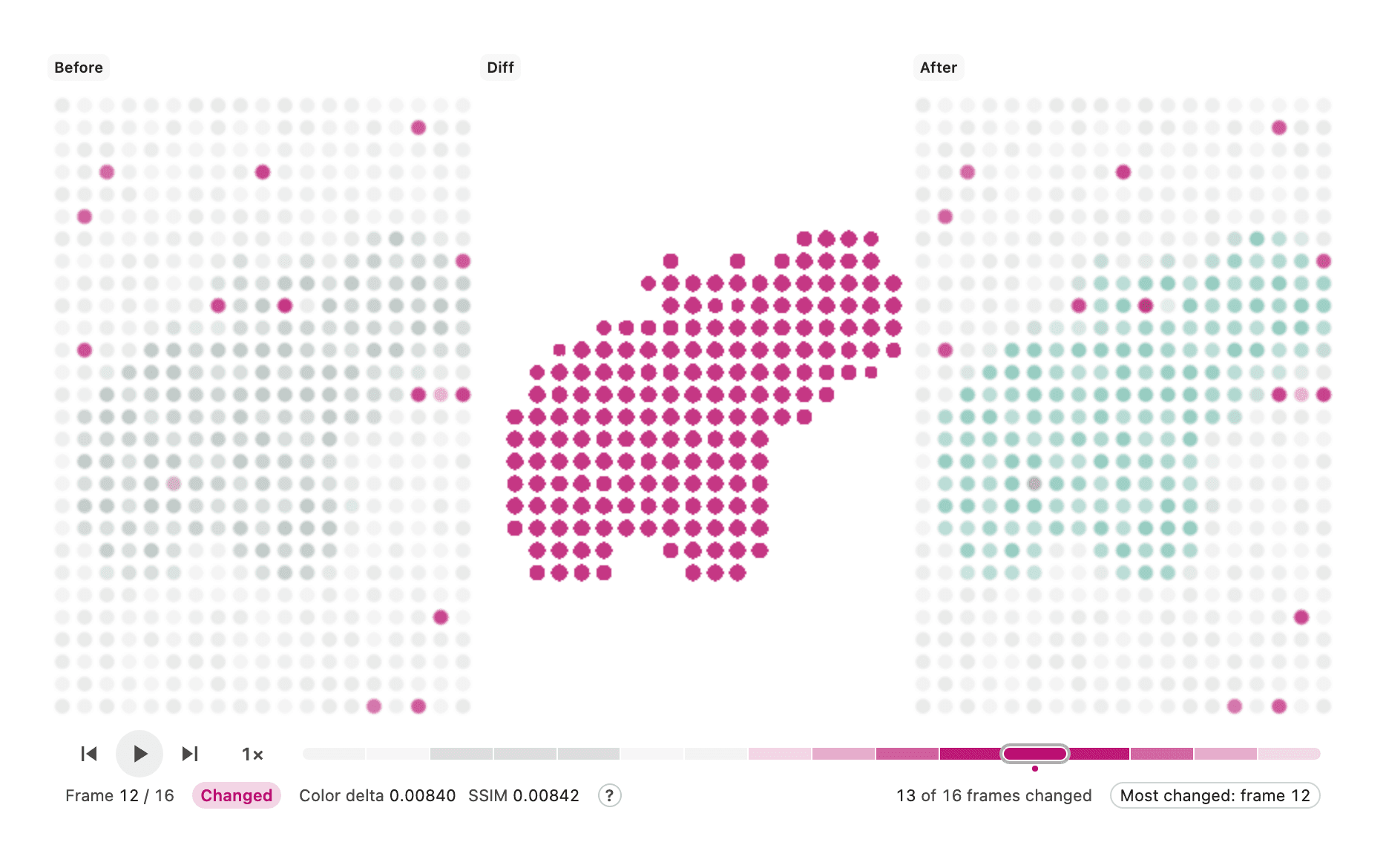
In a Happo report, an animated diff plays the before, the diff, and the after in step. The strip under them marks the frames that changed, darker the more they did. Click the diff to play or pause it, slow it down to half or quarter speed, jump to a frame from the strip, or step through the frames one at a time. On the new compare page, the space bar plays and pauses the diff you are on. The animation testing page has a live diff of the hippo loader in the video below, so you can try it yourself.
The swipe view works for animations too. Both sides play in step while you drag the divider across, so you can compare the same moment before and after.
Turn it on
The rest of this post describes the setup for a Storybook integration. Animated snapshots also work with Happo's Playwright, Cypress, Vitest, pages, and custom integrations; the docs cover how to set animate on each.
With happo v6.18.0 or later, turn animate on for a story that actually moves:
export const Opening = {
  parameters: {
    happo: {
      animate: {
        mode: 'auto',
        prefersReducedMotion: false,
      },
    },
  },
};
mode: 'auto' captures an animated snapshot when the story has an animation Happo can drive, and a static screenshot otherwise. Happo's targets prefer reduced motion by default, and components that respect that preference turn their animations off, which is why prefersReducedMotion: false is there.
Most CSS animations, element.animate(), and SVG SMIL just work. CSS transitions and view transitions do too, once something starts them. If a capture comes out still, the usual cause is a transition that never starts until you click, hover, or add a class. A trigger does that for you, and when it starts a view transition, Happo waits for the transition's animations before it captures.
Once one story looks right, add the menus, dialogs, and loading indicators you care about seeing in motion. Some animations need a little more help: discovery finds animations that start late, like a staggered list, and stages captures a sequence where each step starts the next. If you use stages, upgrade to happo v7.2.0 or later: earlier versions could stop after the first stage when the next one began by re-running an animation they had already captured. Frames are spread evenly by default; sampling places them where the motion is.
Beyond CSS
Not every animation goes through the browser's animation APIs, and Happo can drive more than those:
requestAnimationFrameloops. Withclock: 'virtual', Happo replaces the page's clock, so a loop can be stepped one frame at a time.- Lottie, canvas engines, and anything with its own frame loop. A small driver tells Happo how to find the animation, how long it is, and how to render it at a given time. The hippo loader in the videos above is a canvas drawn by a web worker, captured with a short driver. A
videodriver for<video>elements is built in. - Scroll-driven animations. Reveals, progress bars, and charts that draw themselves as they come into view run on scroll position, not time. With
scrollTimelines: 'seek'(happo v6.23.0 or later), Happo plays them as if the page scrolled past at a steady speed. Chrome, Edge, and Safari run scroll-driven animations; Firefox doesn't yet, so a Firefox target shows your fallback styles.
When a capture has to find something, say so with expect: a number of animations, frames, or stages. A broken animation then shows up in the report instead of quietly becoming a still image.
Quota and usage
Animated snapshots are free for the rest of 2026: they don't count against your quota, however many frames they hold. A story that comes out as a still (nothing to drive, or auto found nothing) counts as one snapshot, like any other.
Happo picks a reasonable frame count by default (10 fps, capped at 24 frames). Every frame is a full screenshot, so capturing too many frames will make test suites run slower. Only turn the knobs if a particular animation needs it.
Limitations
Happo isn't recording a video of your screen; it's reconstructing motion from a timeline it controls. That makes the result deterministic, and it's also why some things are out of scope: Happo has no way to pause or step animated GIF, WebP, and APNG images, and cross-document view transitions, which run as one page navigates to the next, can't be captured. You can capture animations in Chrome, Edge, Firefox, and Safari targets; iOS Safari and iPad Safari targets don't support them.
Try it
Pick one story that moves, add animate, open a pull request, and see what Happo captures. The animation testing page has a tour of what's possible, and the docs cover every option. New to Happo? Sign up to try it.
Send feedback to support@happo.io, especially if a capture comes out still when you expected it to move.
